Showing posts with label Blackberry. Show all posts
Wednesday, February 1, 2012

BlackBerry Playbook Will Support Android Applications

RIM has made good movement, as for me the company attempts to keep the interest of tablet fans on their BlackBerry Playbook or potential buyers by offering the Android apps compatible.

And yes, recently the Canadian-based company has announced their Playbook running on OS 2.0 software (at least) will be supporting Android applications in the near future.

And all the Android applications will be listed in their App World, and available both free or paid. And invite all the Android app developers to repackage their apps to be compatible with Playbook with 0S 2.0, as well as BlackBerry 10 devices.
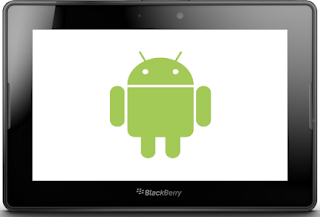
BlackBerry Playbook Android App Support

This predictable movement elaborated on the company official developer site. RIM says, the idea was encouraged during CES and developer meet-ups also conferences they have attended, seeing the great response for BlackBerry Playbook Runtime for Android Apps built-in! Therefore, they are pleased to decide to open access for Android applications availability once BlackBerry Playbook OS 2.0 launched.

However RIM set number of rules before the applications to be approved. Here they are.
BlackBerry App World Rules For Android App Approval

And RIM promised the app submitting and porting process will be easy. However to help your application get more exposure toward consumer and ensuring broader, RIM recommends to perform app submission by February 6th, 2012.

Recommended reading.

Monday, January 16, 2012

Download DingleBerry 3.0.1 To Fix Mac OS Missing Library Error For Windows, Mac OS, Linux

Of course this news will be welcomed with joy by BlackBerry Playbook users who want their tablet jailbroken, because today DingleBerry receives update -- actually the second update of today -- now we have DingleBerry 3.0.1 (previously version 3.0).

As we know DingleBerry is the only jailbreak tool for the first RIM device.

And DingleBerry 3.0.1 beside bring fix for errors found in the Mac OS and previous version. This release also available for three most used Operating Systems at once, for Mac OS and Windows.

You can head over to its developer website to download DingleBerry 3.0.1 to jailbreak your Playbook or if you want to downgrade your Playbook OS to 2.0.0.4869 or 1.0.8.4985.

DingleBerry 3.0.1

Or using this mirror links based on your OS:

Now you can use Hulu and install Android Market to your Playbook, awesome, right?!

Monday, January 2, 2012

How To Fix Bricked Playbook And Factory Reset BlackBerry Playbook

Have you done a factory reset to your BlackBerry Playbook? You have not done so. I think it is the time to do, because there are number of good things you will get after a factory reset your Playbook, like downgrade your Playbook OS, and jailbreak your Playbook OS.

And of course to fix your bricked Playbook tablet, these are what happening when your Playbook is bricked: The LED double-flash when turned off, your Playbook is continuously rebooting and your Playbook tablet can not be used.

So you can fix all of the inconvenient conditions with factory reset your BlackBerry tablet. So let's fix it.

How to reset BlackBerry tablet or factory reset BlackBerry Playbook


What you need:

1. Download BlackBerry Desktop Software for Windows and Mac from BlackBerry site.
2. A computer
3. A micro USB cable.

Instructions:

1. Launch BlackBerry Desktop Software and turn your tablet OFF.
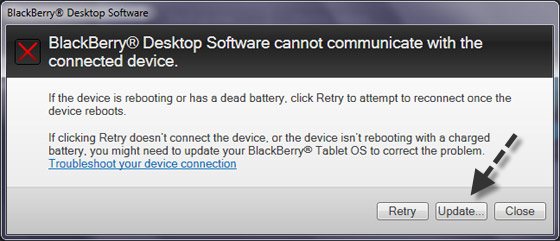
2. Use the USB cable to connect your Playbook to your PC. And then you will get a message informing you that Desktop Software can't communicate with the connected device.
3. Respond the message, by clicking the "Update" button and follow the instructions and then wait.
Desktop Software can't communicate with the connected device
4. Now the BB Desktop will be downloading the OS and continue its step with installing the OS to your tablet. It will take about an hour, at this phase just wait and be sure that your Playbook is always connected to PC, until you are told that it is safe to disconnect it.
5. When the desktop software has fully finished its job. You will be asked to select a general information like selecting language, sign in with BB ID, set time. Just like for the time the tablet brought to your hand.

If you have followed the steps correctly you will have a working Playbook once again.

Sunday, January 1, 2012

How To Downgrade PlayBook OS To 2.0.0.4869 Or 1.0.8.4985

Blackberry has updated their OS to OS 2.0.0.6149 (Beta) in order to close down the access for rooting the BlackBerry Playbook using the DingleBerry tool. So, the result is no one will be able to root their Playbook anymore, albeit if you able to you won't get anything valuable, as for the most valuable result offered by rooting your Playbook, which is Android Market is not longer work, since RIM has broken the market account and sync. How pathetic.

But, fortunately workaround to the said problem appeared, what else beside downgrade back to the OS 2.0.0.4869 (beta)? Even though the official download link for the OS is no longer available. But worry not, people from OpenSourceBB have post the how to tutorial to get the OS version available plus the OS links.

So you can downgrade your Playbook OS to the older versions and finally be able to root your Playbook and gaining access to Android Market.

In overall, the workaround is to fool your BB Desktop software to install the 2.0.0.4869 to your Playbook. And OSSB has provided the link to the said OS.

Let's reclaim the 2.0.04869 OS to root your PLaybook afterward:

How to downgrade Playbook OS from 2.0.0.6149 (Beta) to 1.0.8.4985 or 2.0.0.4869


Step 1. Download the latest release of BB Desktop Software from OSBB. Then backup your Playbook OS -- Not recommended -- however it's better to do so. Here is the link.

Step 2. Download the QCFM from Multiupload here -- and then extract the file to your desktop:


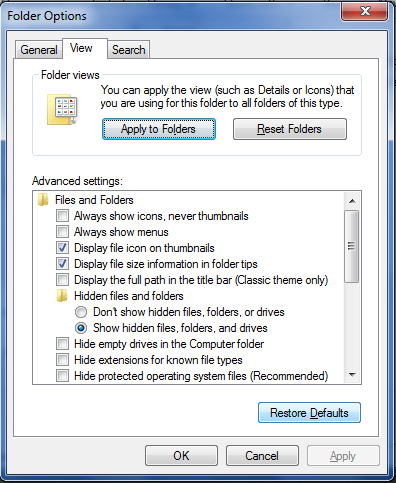
Step 3. Head to C:\Users\*Your User Name*\AppData\Roaming\Research In Motion\BlackBerry\Loader Cache. To get to the directory your system might ask you to enable viewing hidden files or folder, if that so to reach there - simply open the options of your folder to enable it below View tab, now you will see it.

Enable Hidden Files

Step 4. Open Desktop Software, and then click Device tab, choose "Update", you will be notified for no updates available. Ignore it, then click "View Other Versions", on the lower part of the screen. Choose OS2 to downgrade to 2.0.0.4869, or OS1 to downgrade to 1.0.8.4985. Once you've selected the OS, hit "Install" to begin the installation.


And if you choose OS 2, would be like this and then hit INSTALL:


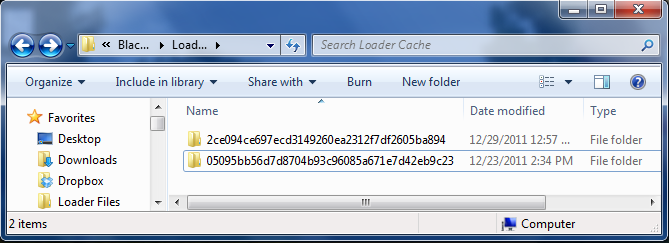
Step 5. Back to Loader Cache folder -- see the step 3. You will be seeing folder, could be one or two folders, if there are two, then see date and hours of folder -- pick the newest one. In that folder you will find the Playbook OS.
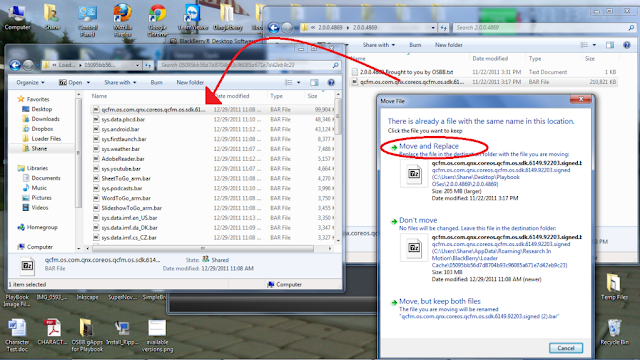
Step 6. Just wait for QCFM finish downloading the OS, it's 200 mb size -- could be better to take a cup coffee while waiting. And then rename the QCFM bar you have downloaded from step 2 with similar name of the QCFM bar that BlackBerry Desktop Software downloaded.

Step 7. Replace the QCFM bar you downloaded using Desktop Software with the one from step 2 above. You can both drag and drop it or copy and paste it. Once the popup appears saying "duplicate files", means you are on the right road.
Replace BB QCFHM

Step 8. Again, just wait for the downgrading process to takes place, it will downgrade your Playbook. Once it's finished, you should see your OS version is already downgraded to your chosen version -- simply open options and check OS version of yours on About menu.

Step 9. Finish.

Congratulation now your OS is downgraded you can continue to jailbreak your PLaybook using DingleBerry tool or
fix bricked Playbook And Factory Reset BlackBerry Playbook.

Via:OSBB.

Saturday, December 10, 2011

Jailbreak BlackBerry PlayBook With DingleBerry B 0.5.1

Do you want to jailbreak your BlackBerry Playbook? Your wish is come true, because the newest DingleBerry Beta 0.5.1 already been released. First off, it's good to find out what you will get from jailbreaking your Playbook.

After you have jailbreak the Blackberry Playbook with DingleBerry you will gain root access of your Tablet and brings the Android Market to the RIM's tablet and then doing something else under Admin rule.

However this DingelBerry tool is in the early stage, so don't expect too much and too high, do it own your risk. I am not responsible for any damages or bricks caused after you jailbreak your Playbook.

Jailbreak BlackBerry Playbook With DingleBerry B 0.5.1


1. Download DingleBerry B 0.5.1 from this link.
2. Extract the .zip file, and run it.
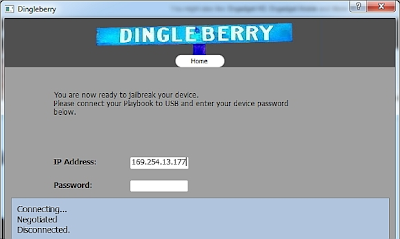
3. You will see login form windows appears, then fill it with your IP address and Password (go to your Settings and About and then Network).
DingleBerry Asks IP And PassWord


4. Enable your Wi-fi file sharing and password protected sharing

5. Run the DinggelBerry and start to root your Playbook.

Hope this post helps you.

Tuesday, October 25, 2011

BlackBerry Bold 9790 Photo

This is the photo who is claimed to be BlackBerry Bold 9790, this phone photo was taken a photographer and it does not look clear especially on the keyboard area. Some says that the buttons of the Bold 9790 look similar like on BB the Torch 9860 and 9850. Do you think so?

BlackBerry Colt Specifications (Rumor)

Want to know on what's the specification of BlackBerry Colt would have? The recent rumor of this BBX platform based superphone appeared recently, and it's said that BBX platform is the new name QNX and chosen to be the operating system for this upcoming Blackberry smartphone. For refreshing purpose, QNX is used as the OS for the Blackberry Plabook tablet.

Thursday, January 13, 2011

BlackBerry Torch 2 Specs And Picture Leaked

BlackBerry Torch 2

Did you know the upcoming series of Blackberry Torch specs and picture are leaked recently? The successor of Torch 9800, Torch 2, or at least it's assumed to be, has been leaked by BGR and the image of this handheld is spread out the net now. According the site, there is no much changes can be found, except the important part of it, like CPU speed from the previous 624MHz is increased to 1.2GHZ.

Wednesday, December 8, 2010

Demo Video Of BlackBerry Playbook By Mike Lazaridis

Video Mike Lazaridis Demo BlackBerry Playbook

Finally there is a real demo video of BlackBerry Playbook, the first RIM tablet Computer. When it was announced we had not have a chance to witness its performance and ability clearly, but now Mike Lazaridis all by himself shows the slate's ability at the D: Dive Into Mobile conference and it's recorded into video which you can watch now.

Tuesday, September 28, 2010

When Will BlackBerry PlayBook Be Available Or Released In United States (US)?

BlackBerry PlayBook

If you are asking on when will the new professional-grade BlackBerry PlayBook be available or released on the United States (US), this post is intended to answer to that question. According Blackberry official site, the Blackberry Playbook will available on US in early 2011. Here is the quotation I took from RIM press release official site:

Blackberry Playbook, Blackberry Playbook Specification

Blackberry Playbook Specification. Yesterday RIM (Research In Motion), through its CEO, Mike Lazaridis announced their tablet computer technology, Blackberry Playbook at the Developer Conference 2010 in San Francisco. The name of Playbook is so unexpected as the previous rumors led us to believe RIM would name its tablet whether Blackpad or Surfbook, they picked Playbook. IMHO I prefer Surfbook.